



Zultys introduces a powerful set of AI-powered productivity tools designed to make conversations more accessible and insightful across the platform with our latest system Release 19.0.
These capabilities embed artificial intelligence directly into everyday communications, helping users follow discussions in real time, capture important details automatically, and quickly locate key moments after calls end.
Release 19 includes support for AI capabilities such as live closed captions, live transcription, and real-time sentiment analysis — helping users follow conversations as they happen — and post-call transcripts after the call.
ZAC 10.0.10 when used with an MX system on Release 19 provides an enhanced Contact Center call log for supervisors and improvements to the user call log — combined with semantic search across all calls — delivering greater visibility and actionable insights to improve performance and customer experience.
In addition, the new Zultys AI Auto Attendant™, an enhancement to Zultys’ Classic Auto Attendant, uses natural voice recognition to intelligently route callers without relying on traditional dial-based menus.
AI-enabled capabilities can be activated through Zultys AI Services — available with new ZCS Enhanced Bundles — or through a Bring Your Own (BYO) AI API key model, depending on deployment and configuration. To enable AI features across Mobile ZAC 2.2, ZAC, and Web ZAC, Zultys AI Services and/or BYO API keys must be provisioned on the MX system. As part of a limited-time Release 19 promotion, customers or partners can provide their own API keys for third-party AI services with no additional Zultys purchase required. Future releases are expected to introduce paid licensing.
Additional updates include expanded configuration capabilities within Zultys’ browser-based Web Admin, creating a more unified and accessible management experience for system admins.
All users also benefit from improved feature parity across ZAC, Web ZAC, and Mobile ZAC 2.2. Enhancements to the ZAC and Web ZAC user experience deliver a more intuitive interface for everyday tasks.
Alongside this release, a new version of Mobile ZAC is available on the Google Play and Apple App stores. Mobile ZAC 2.2 supports these new AI capabilities and includes improvements to the call log, enhancements to messaging and notification management, and system speed dial access. Click here to read the Mobile ZAC 2.2 release notes.
Zultys is also launching its new product, Zultys AI Receptionist™, an AI-powered voice agent and receptionist service that answers every call with intelligent, human-like interactions. When escalation is required, calls are seamlessly routed to the appropriate person or department. Click here to read the Zultys AI Receptionist release notes.
These capabilities — delivered through Zultys’ latest release, updates to its applications and mobile experience, and the new AI receptionist product — are turning conversations into actionable information. Together, they help organizations gain deeper visibility into customer interactions, improve response times, and make more informed decisions.
Release 19
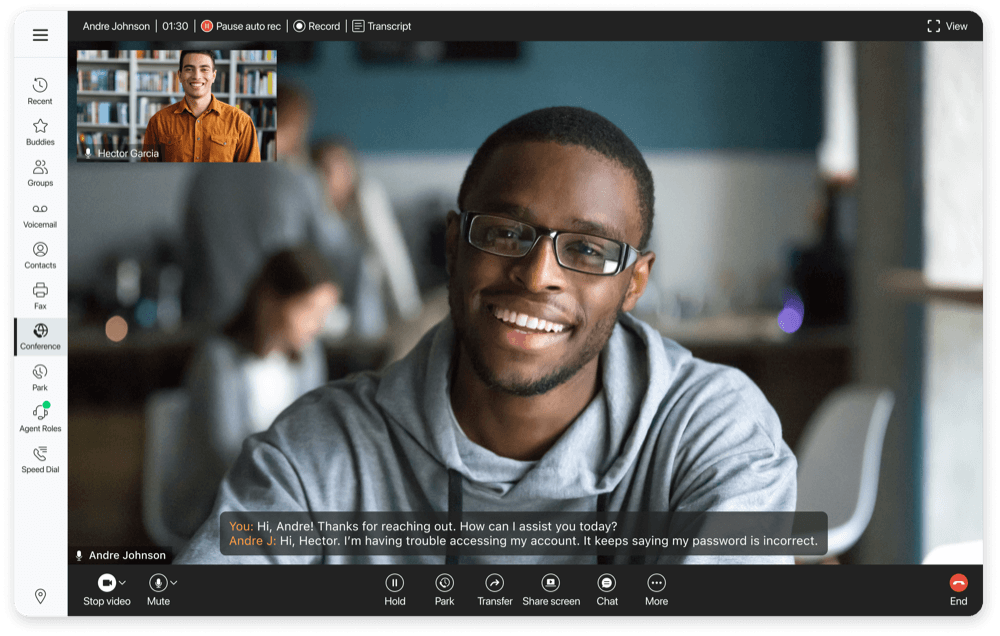
AI Closed Captions
Closed captions display spoken words as on-screen text in real time, making conversations easier to follow and understand. Available for one-to-one calls, conference calls, and call group calls, they help keep communication clear and accessible — whether users are in a noisy environment, multitasking, or hearing-impaired. Closed captions can also be configured at the user level to automatically save as a transcript when one-to-one calls end.
AI Transcription
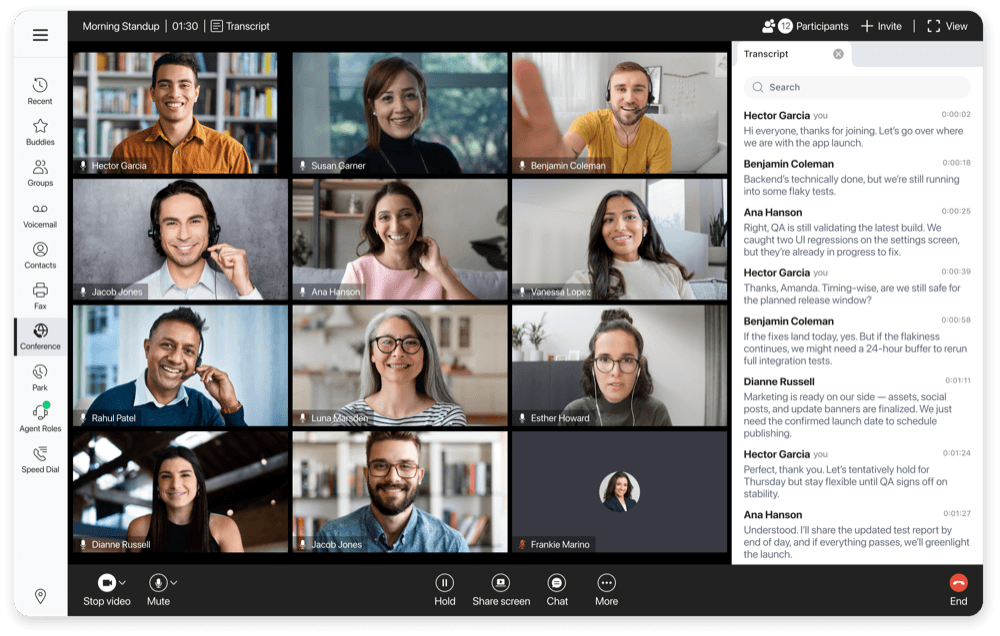
Live transcription converts spoken conversations into searchable written text in real time. Available for conference calls and call group calls, it provides full conversational context as it happens, and users can search for keywords within the transcript to quickly locate important moments. The transcript can be viewed directly in ZAC through the transcript panel.
AI Sentiment Analysis
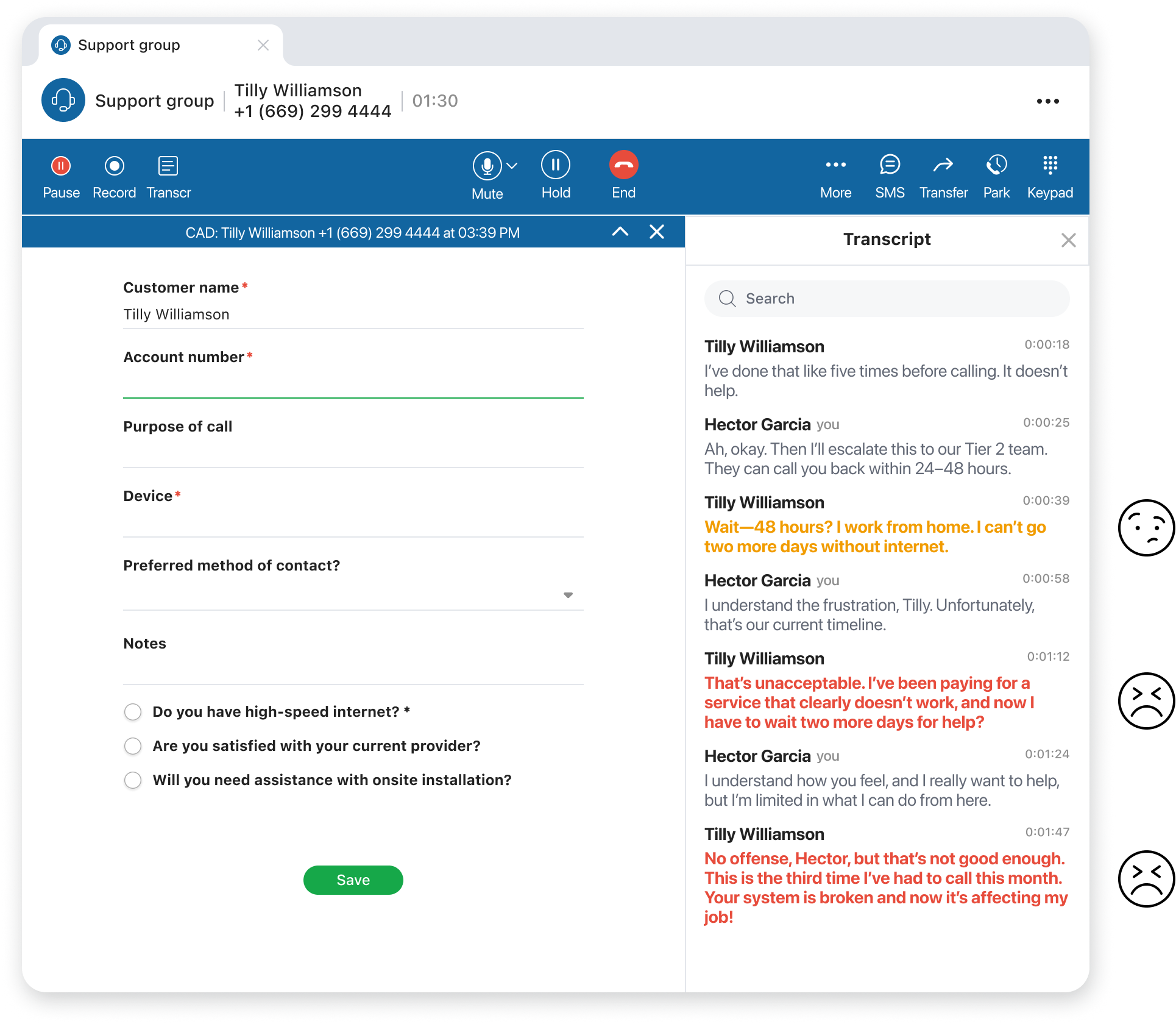
Sentiment analysis uses AI to evaluate conversation transcripts and detect when a caller’s experience may be turning negative. Available for ICC groups, agents can view live sentiment insights directly within the transcript panel as the conversation unfolds. If sentiment shifts to negative, supervisors can receive real-time pop-up alerts in the SuperView application, enabling them to step in quickly and support agents before issues escalate.
AI Post-Call Transcripts
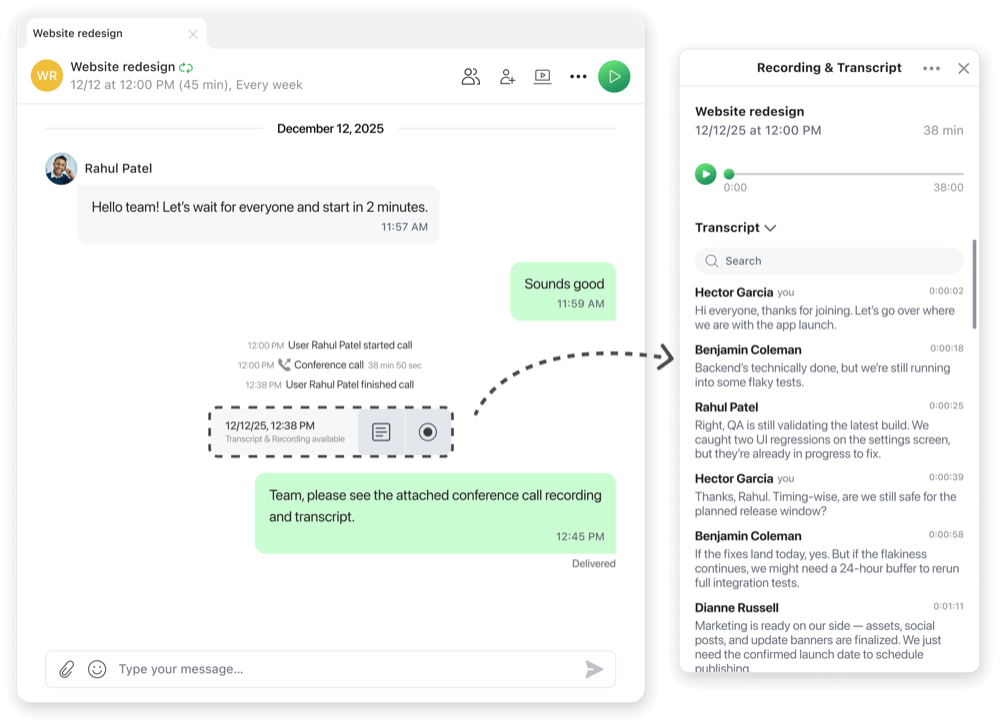
Post-call transcripts provide a complete written record of a conversation after the call ends. Available for one-to-one calls, conference calls, and call group calls, transcripts allow users to review, search, and reference what was discussed, and can be downloaded for documentation, sharing, or future reference. Regular users can access transcripts directly in the call log, while agents and supervisors can view them within their respective call logs or through the Zultys call recording viewer. Users can search individual transcripts for exact keywords. Users can also search all transcripts at once from the call log, with semantic search surfacing related phrases and similar meanings — even when the exact words weren’t used. If MX Archive is enabled, transcripts are automatically moved to the archive server for long-term storage.
New Contact Center Call Log
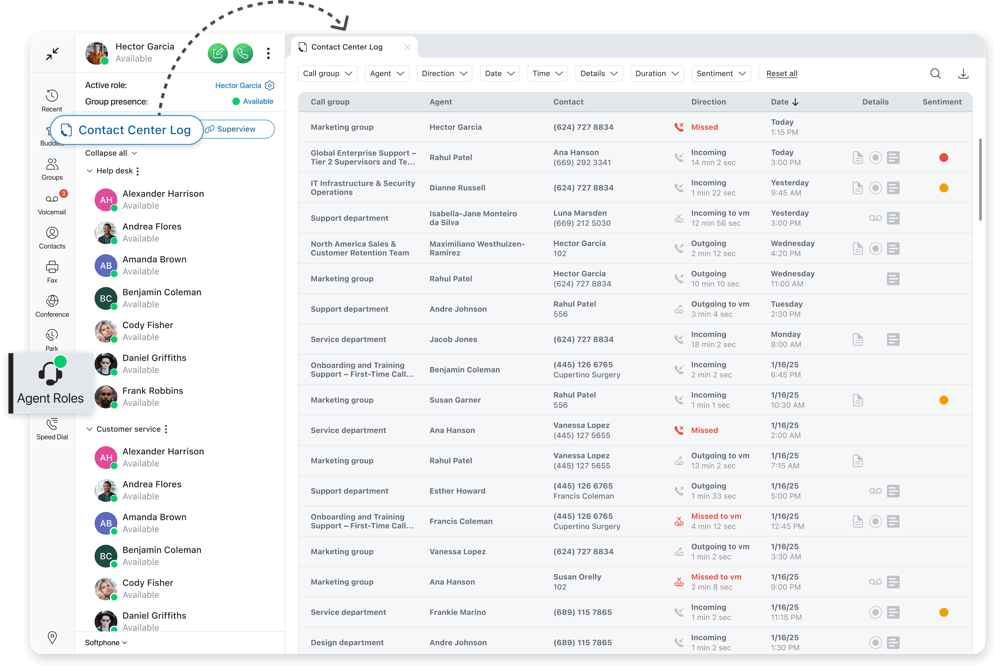
The new Contact Center Call Log within the Agent Roles tab gives supervisors powerful insights across all ICC call groups — all within ZAC.
Supervisors can investigate an agent’s call activity and open conversations to review Call Attached Data, call history, and call recordings. When AI features are configured, they can also access full transcripts and sentiment analysis for every call, providing an at-a-glance temperature check of customer service. New visual indicators help supervisors quickly identify which calls include additional interaction data, such as Call Attached Data, call recordings, transcripts, faxes, and voicemails.
Supervisors can search across all call records using any text or detail associated with an interaction through full-text search, making it easy to quickly find specific calls based on names, numbers, timing, or other recorded information. Semantic search across call transcripts surfaces related phrases and similar meanings — even when the exact words weren’t used — while advanced filtering options allow supervisors to narrow results by call attributes, duration, timeframes, and available interaction data. As searches are refined or filters are applied, a results counter at the bottom of the screen dynamically updates to show the number of matching records.
These highly requested capabilities enable supervisors to quickly dig into call center agent activity without needing to run MX Report or open the Call Recording Viewer. By bringing complete interaction context into one place, the new Contact Center Log helps supervisors make smarter, faster team management adjustments.
Enhanced User Call Log
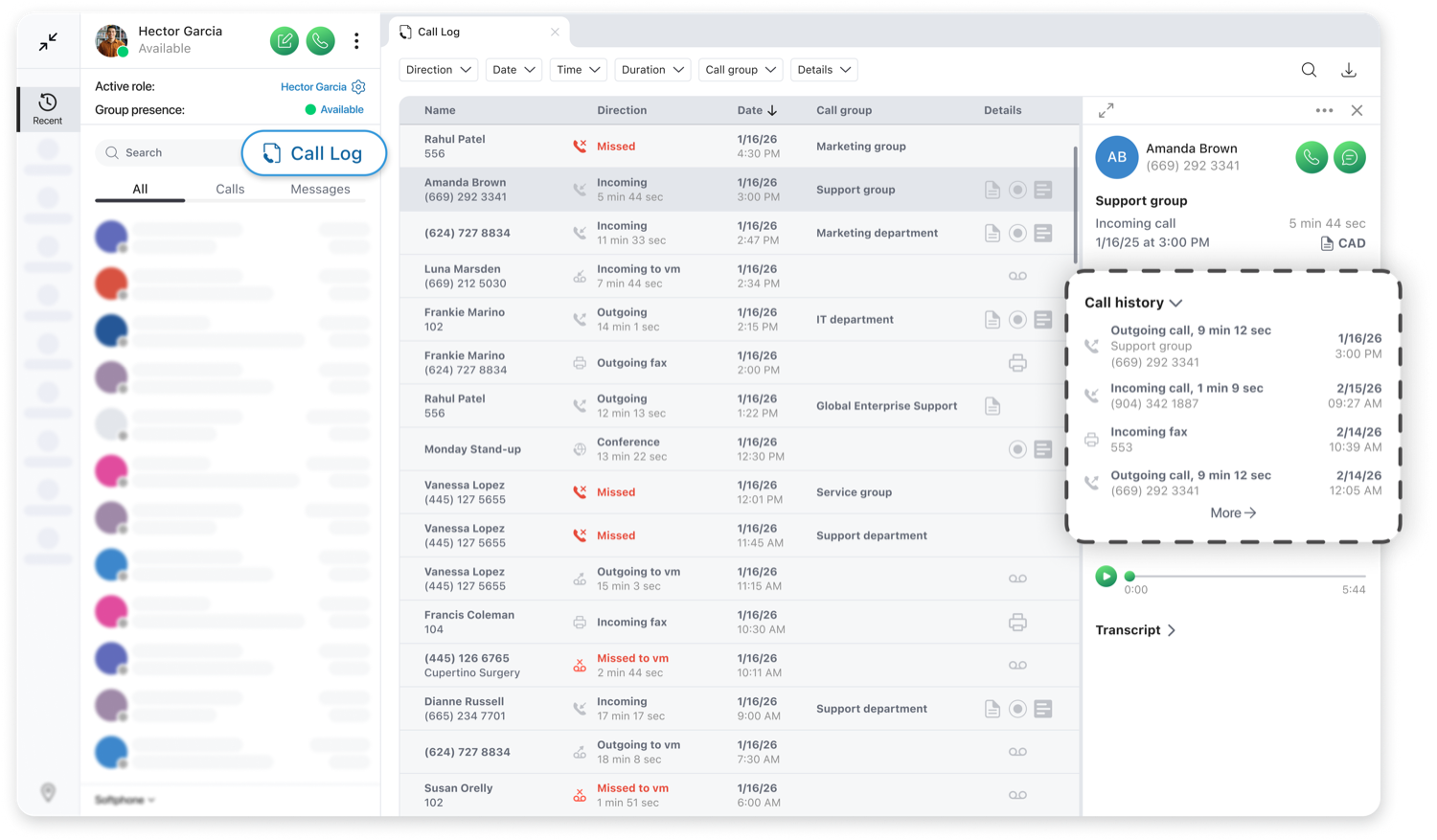
The call log for regular users has been enhanced to provide easier access to call details for every interaction. Selecting any call entry opens a call history view that displays a summary of previous interactions with the same phone number, making it easier to review past conversations and understand the full context of the relationship. New visual indicators help users quickly identify which calls contain additional interaction data, including Call Attached Data, call recordings, transcripts, faxes, and voicemails.
Users can search across all call records using any text or detail associated with an interaction through full-text search, making it easy to quickly find specific calls based on names, numbers, timing, or other recorded information. The search experience is further enhanced with semantic search across call transcripts, which surfaces related phrases and similar meanings — even when the exact words weren’t used. Advanced filtering options also allow users to narrow results by call attributes, duration, timeframes, and available interaction data. As users refine their search or apply filters, a results counter at the bottom of the screen dynamically updates to display the number of matching records.
AI Auto Attendant
The Zultys AI Auto Attendant uses voice recognition and speech-enabled technology to understand natural spoken requests from callers and intelligently route them to the appropriate person, department, or resource without relying on dial-based menus. This creates a more modern, conversational experience while preserving the familiar auto attendant capabilities organizations rely on. When a caller states what they need, the AI Auto Attendant interprets the request and automatically triggers the appropriate action within the MX system, streamlining call routing and eliminating the need to navigate traditional menu prompts.
Connect Third-Party AI Providers
Release 19 enables organizations to connect third-party AI agent providers that are not natively integrated into the platform. Using SIP call forwarding, calls can be passed to external AI services, providing a simple and flexible way to extend AI capabilities within the Release 19 ecosystem. This approach allows businesses with unique integration requirements to connect external AI agents directly to the MX system.
In addition to voice interactions, SMS responses and webchat conversations can be powered by independent AI services and securely passed through the MX for execution, enabling tailored and intelligent customer experiences. Zultys currently supports integration with PolyAI and can work with other AI providers, giving organizations the flexibility to incorporate the AI solutions that best fit their needs.
Web Admin Updates
The new intuitive browser-based Web Admin now supports the majority of administrative and essential configuration tasks found in MX Admin, and is accessible from any modern browser on both PC and Mac. Designed to bring nearly all day-to-day administrative functions into a single browser-based workspace, Web Admin streamlines management and improves accessibility, making it easier to manage the system without requiring a desktop application:
- New dashboard provides administrators with a quick snapshot of system activity
- Call handling rules are now accessible under user settings, such as forwarding calls after a set amount of time
- Notification rules are now available under user settings, including options like notifying users when a voicemail is received
- Assign users to call groups directly while editing an individual user, without navigating to the operator and call group section
- Expanded contact center configuration allows access to detailed contact center settings, reducing management time
- Zultys’ classic dial-based auto attendant can now be set up and managed entirely within Web Admin
ZAC 10.0.10
Interface Enhancements
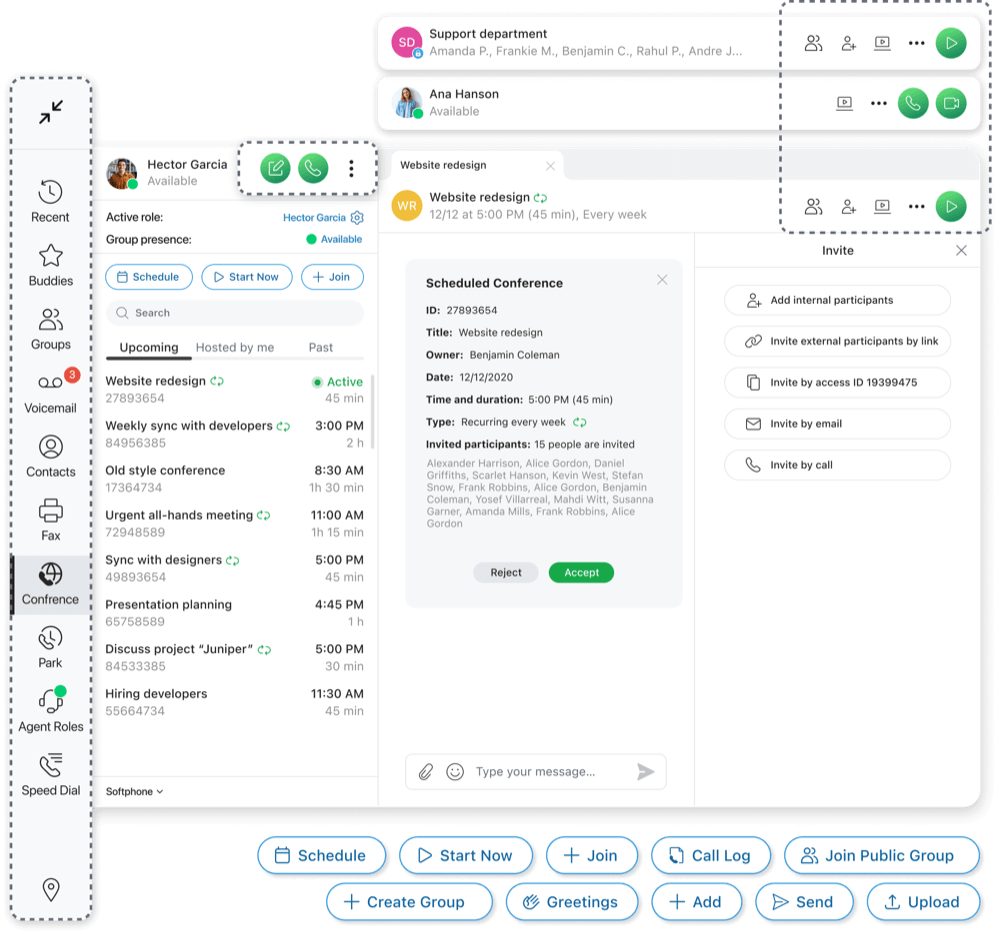
ZAC 10.0 introduces a refreshed interface with refinements that make everyday tasks easier and more intuitive. The updated design focuses on clarity, simplicity, and ease of use, creating a cleaner experience that helps users navigate and complete common actions more efficiently:
- Improved visual hierarchy for clearer actions and next steps, with a more modern look
- Modernized greeting configuration interface for easier setup and management
- Updated settings screen with a restructured layout and left-side navigation for more intuitive control
- Refreshed notification styling with a simplified design that makes alerts more visually pleasing and easier to act on
Mobile App Update With Mobile ZAC 2.2 and New Product With Zultys AI Receptionist
Alongside this release, Zultys introduces Mobile ZAC 2.2 and Zultys AI Receptionist.
Mobile ZAC 2.2 extends many of the Release 19 capabilities to mobile users, including support for live closed captions, live transcription, post-call transcripts, and sentiment analysis. Enable AI-powered productivity from anywhere with Mobile ZAC that’s configured with Zultys AI Services and/or Bring Your Own API Keys on a system with Release 19.0 or later. Learn more about Mobile ZAC 2.2 here.
Zultys AI Receptionist serves as a 24/7 front-line resource that engages callers the moment they connect using natural, conversational language. Powered by conversational AI and voice recognition, it understands caller intent, answers questions, and manages full conversations using approved information sources — delivering AI customers can trust while routing and assisting in real time. Zultys AI Receptionist is a standalone product, delivered separately from Release 19 and independent of the core Zultys platform. Learn more about Zultys AI Receptionist here.
Get the Latest Updates and Share Your Feedback
Contact Zultys or your authorized Channel Partner for more information. ZAC 10.0.10 is now available for download here and will be available via auto-update for systems with Release 18 or higher starting April 16.
We appreciate your help in improving the user experience. The feedback you give us allows our engineering team to apply that knowledge to the ongoing innovation of our Unified Communications platform. To submit a new feature development request, please fill out our form here.



