Connect With an Expert: 888-985-8971




Integrated Contact Center
Drive productivity gains for your company’s contact center with AI-powered technology.
Zultys has created its Integrated Contact Center (ICC) to optimize operations and efficiently handle a high volume of customer calls. Available as a web-based or desktop application, it comes pre-packaged with features designed to streamline processes and enhance the customer experience. ICC can improve the productivity and effectiveness of customer service departments of any size and call volume and supports AI-enabled capabilities like closed captions, transcription, and sentiment analysis.

Configure Incoming Calls to Fit Your Work Style
Intelligently process incoming calls to agent phone lines based on preset rules and real-time conditions. Incoming calls can ring all employees in the department, or one person at a time, depending on the work style. An incoming caller can be routed to the best employee to help them based on specific criteria. If a customer calls back within a certain amount of time, their call can be sent to the same agent who helped them before, so they don’t have to explain themselves again.
Utilize Technology That Makes Teamwork Easy
The ICC is integrated into Zultys Advanced Communicator (ZAC). This enables employees to easily send instant messages, frequent corporate group chats, schedule conferences, and quickly judge the availability of coworkers from their Presence state, in addition to utilizing all their Integrated Call Center features. All of this is accomplished using a single pane of glass, intuitive interface that’s available on PC, Mac, and Linux, with no need to juggle multiple technology vendors to collaborate across teams.
Access Chat, Call, & Voicemails in the Same Queue
Zultys ICC includes a webchat feature which allows customers to chat with support on the company website instead of calling them. The system makes sure that if an agent is on a call, they won’t be bothered by any chat messages, or vice versa. All incoming customer interactions, whether they are webchat messages or phone calls, are prioritized to be answered in the order they come in.
The ICC can also be configured to eliminate frustrating waits for customers, giving them the option to leave a voicemail that holds their place in line, rather than waiting on hold for the next agent to become available. Customers can then go on with their day until a call center agent gets back to them.
Capture a Call From the Start With On-Demand Recording
The ICC can automatically record all phone calls and archive these recordings for an indefinite amount of time. When taking down sensitive information, like credit card or social security numbers, employees can easily pause the automatic recording to protect their customer’s privacy. The Record On-demand feature will capture a call from the very beginning, even if it is activated in the middle of call, so there’s no need to worry about losing an important part of a conversation because an agent didn’t press the record button fast enough. As an additional tool, Call Recording Viewer, accessible from a web browser as well as the application, lets users listen to recordings and save them to any device. This gives employees more flexibility to access valuable information when working remotely or on the road.
AI Productivity Tools and Insights for Contact Centers
The Zultys platform includes support for AI capabilities such as live closed captions, live transcription, and real-time sentiment analysis — helping Agents follow conversations as they happen — and post-call transcripts after the call with supervisors gaining all this visibility as well as receiving real-time sentiment alerts when necessary.
Gain Quick Insight With Workflow Visibility Tools
Managers and agents can access advanced ICC features like SuperView, Wallboard, and Call Recording Viewer from anywhere via a web browser from any tablet, smart phone, or PC or Mac computer.
With access to ZAC, employees can easily communicate internally with teammates, and externally with customers or in cross-company collaborations as easily as if they were sitting at a cubicle in the office, if they have access to Wi-Fi.
Optimize Platform Integration
The Zultys MX platform is built on Open Standards including SIP, MySQL, VXML, CSTA, TAPI, and SYSLOG providing the ability to integrate ICC with Salesforce.com, MS Outlook, Skype, and other third party applications. ScreenDial lets users call from any application, enabling them to conveniently dial directly from a CRM, an Electronic Medical Record (EMR), a Word or Excel document, or a website.
Configure Incoming Calls to Fit Your Work Style
Intelligently process incoming calls to agent phone lines based on preset rules and real-time conditions. Incoming calls can ring all employees in the department, or one person at a time, depending on the work style. An incoming caller can be routed to the best employee to help them based on specific criteria. If a customer calls back within a certain amount of time, their call can be sent to the same agent who helped them before, so they don’t have to explain themselves again.
Utilize Technology That Makes Teamwork Easy
The ICC is integrated into Zultys Advanced Communicator (ZAC). This enables employees to easily send instant messages, frequent corporate group chats, schedule conferences, and quickly judge the availability of coworkers from their Presence state, in addition to utilizing all their Integrated Call Center features. All of this is accomplished using a single pane of glass, intuitive interface that’s available on PC, Mac, and Linux, with no need to juggle multiple technology vendors to collaborate across teams.
Access Chat, Call, & Voicemails in the Same Queue
Zultys ICC includes a webchat feature which allows customers to chat with support on the company website instead of calling them. The system makes sure that if an agent is on a call, they won’t be bothered by any chat messages, or vice versa. All incoming customer interactions, whether they are webchat messages or phone calls, are prioritized to be answered in the order they come in.
The ICC can also be configured to eliminate frustrating waits for customers, giving them the option to leave a voicemail that holds their place in line, rather than waiting on hold for the next agent to become available. Customers can then go on with their day until a call center agent gets back to them.
Capture a Call From the Start With On-Demand Recording
The ICC can automatically record all phone calls and archive these recordings for an indefinite amount of time. When taking down sensitive information, like credit card or social security numbers, employees can easily pause the automatic recording to protect their customer’s privacy. The Record On-demand feature will capture a call from the very beginning, even if it is activated in the middle of call, so there’s no need to worry about losing an important part of a conversation because an agent didn’t press the record button fast enough. As an additional tool, Call Recording Viewer, accessible from a web browser as well as the application, lets users listen to recordings and save them to any device. This gives employees more flexibility to access valuable information when working remotely or on the road.
AI Productivity Tools and Insights for Contact Centers
The Zultys platform includes support for AI capabilities such as live closed captions, live transcription, and real-time sentiment analysis — helping Agents follow conversations as they happen — and post-call transcripts after the call with supervisors gaining all this visibility as well as receiving real-time sentiment alerts when necessary.
Gain Quick Insight With Workflow Visibility Tools
Managers and agents can access advanced ICC features like SuperView, Wallboard, and Call Recording Viewer from anywhere via a web browser from any tablet, smart phone, or PC or Mac computer.
With access to ZAC, employees can easily communicate internally with teammates, and externally with customers or in cross-company collaborations as easily as if they were sitting at a cubicle in the office, if they have access to Wi-Fi.
Optimize Platform Integration
The Zultys MX platform is built on Open Standards including SIP, MySQL, VXML, CSTA, TAPI, and SYSLOG providing the ability to integrate ICC with Salesforce.com, MS Outlook, Skype, and other third party applications. ScreenDial lets users call from any application, enabling them to conveniently dial directly from a CRM, an Electronic Medical Record (EMR), a Word or Excel document, or a website.
Call Center Management Made Easy With Smart Integration
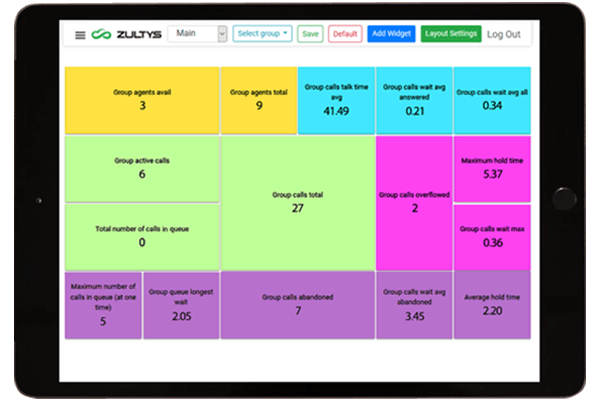
A real-time, customizable view of all activity with Wallboard and SuperView.
Wallboard
Wallboard can show call and Agent data for one or more call groups at the same time, providing managers a complete, real-time Call Center overview. This enables them to show information to agents in a format that’s easiest for them to act on, increasing speed and efficiency in managing and directing customer calls. Wallboard can be displayed on a large screen in the middle of a room or viewed from a smartphone or tablet via a web browser, giving managers the ability to optimize ICC usage on-premises or remotely if necessary.
SuperView
SuperView is a powerful web-based tool that allows ICC Managers to see real-time statistics on multiple departments at the same time. SuperView is accessible through a web browser, which requires no installation. Managers can set up multi-level alerts based on multiple criteria and know immediately when a call group is on the verge of a problem, enabling them to reallocate people to help on the fly. The caller queue can be managed from the same interface and calls can be assigned to specific support agents for high-priority customers.
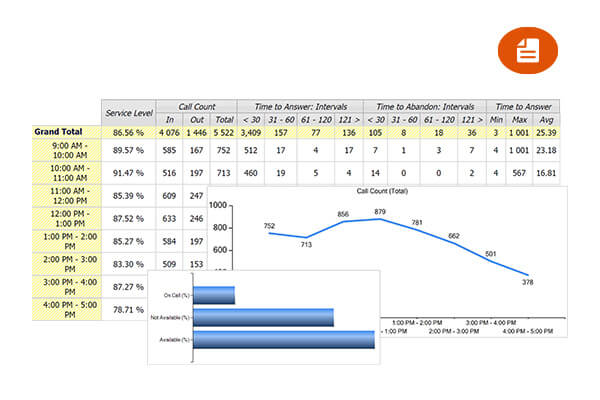
MX Report — Giving You the Analytics You Need
You can run reports based on the Integrated Contact Center’s historical data to analyze business productivity and improve operations with the MX Report feature. It comes with pre-configured report templates but can also be customized to better fit specific business needs in a multitude of industries. Make educated decisions based on historical data to save on expenses and optimize workflow.
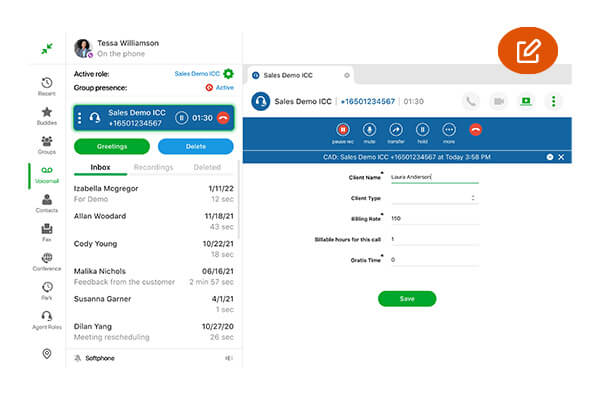
Call Attached Data — Giving Your Team Context to Engage
While on the phone with customers, Agents can take notes in a special notes pop-up called Call Attached Data (CAD). It can take the form of free-style notes or a preset questionnaire. If this call is transferred or the customer calls back later, the notes will pop up again — no need for a customer to repeat their request or questions to a new agent. CAD can be edited with updates on the case even long after the call is over.
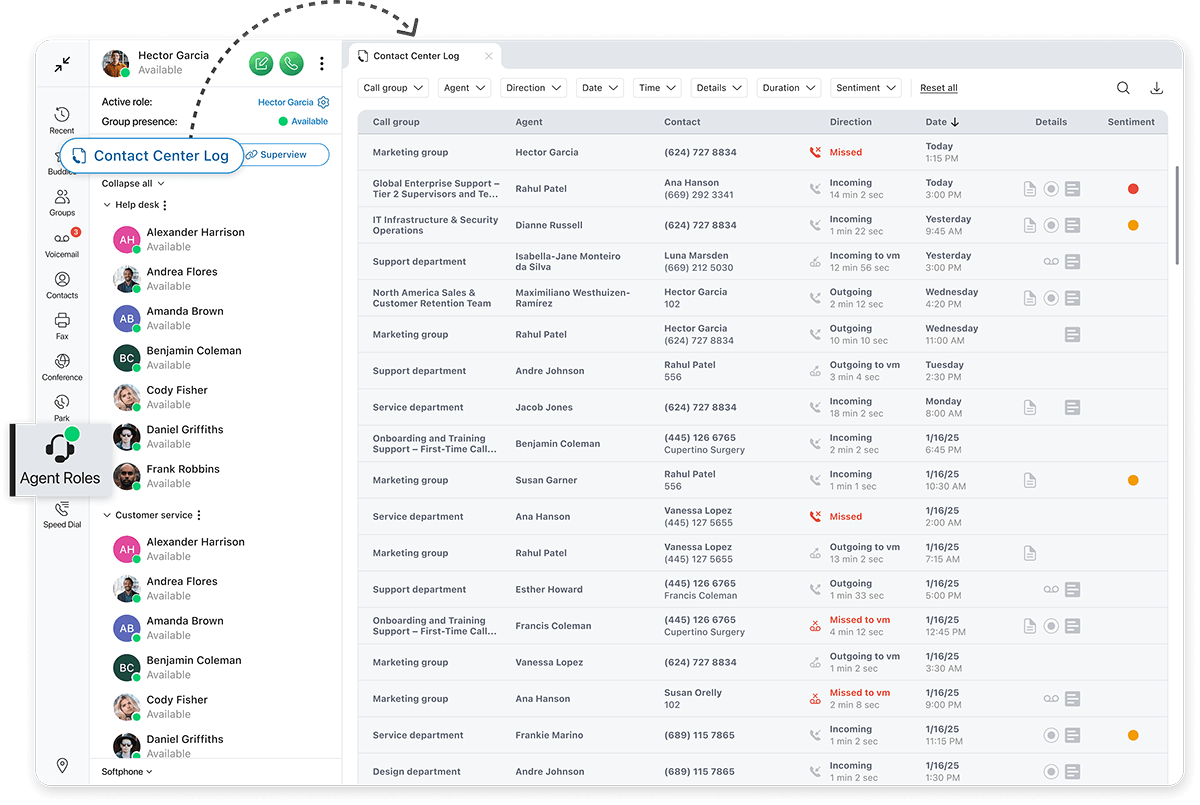
Contact Center Call Log
Supervisor Visibility Across All ICC Call Groups — Directly in ZAC
Investigate Every Interaction With Complete Context
Supervisors can investigate an agent’s call activity and open conversations to review Call Attached Data, call history, and call recordings. When AI features are configured, they can also access full transcripts and sentiment analysis for every call, providing an at-a-glance temperature check of customer service.
Visual indicators help supervisors quickly identify which calls include additional interaction data, such as Call Attached Data, call recordings, transcripts, faxes, and voicemails.
Advanced Search Across All Call Records
Supervisors can search across all call records using any text or detail associated with an interaction through full-text search, making it easy to quickly find specific calls based on names, numbers, timing, or other recorded information.
Semantic search across call transcripts surfaces related phrases and similar meanings — even when the exact words weren’t used — while advanced filtering options allow supervisors to narrow results by call attributes, duration, timeframes, and available interaction data.


Simplified Supervisor Workflow
These capabilities enable supervisors to quickly dig into call center agent activity without needing to run MX Report or open the Call Recording Viewer.
By bringing complete interaction context into one place, the new Contact Center Call Log helps supervisors make smarter, faster team management adjustments.
Key System Features
- Advanced Call Routing based on real-time activity
- Call Recording — full-time and on-demand
- Call Attached Data (CAD) for customizable Agent Scripts, wrap up/exit codes, and more
- Optional integration with external CRM & Outlook, workforce management applications, and other 3rd party tools, as well as support for AI integrations
- User call log provides one screen for viewing CAD, recordings, transcripts, faxes, and voicemails
- Multiple Reporting options
- Webchat Capabilities
- Multimedia Queue – calls, webchats and callback requests are queued in the order they are received
- Customizable music-on-hold & position in queue & expected wait time announcements
- Last Agent Routing option will send repeat callers to the same agent that handled their previous call
- Fully integrated fax server
- Wallboard for real-time ICC group analysis
Key Supervisor / Agent Features
- Chat, Instant Message & Presence allows agents to collaborate effectively
- Supervisors can Silent Monitor, Barge in & Whisper-thru to Agents and receive real-time pop-up alerts in the SuperView application when conversations go negative
- Supervisors monitor all activity in SuperView: Real-time call monitoring & statistics for multiple ICC Groups in a single window and review call group activity in the Contact Center Call Log
- Agents can manage calls and texts on their mobile devices with Zultys Mobile
- Communicator for iPhone and Android
- Calls can be assigned to specific Agents
- Agents can be members of multiple ICC groups
- Agent login/logout – initiated by Supervisor or automatically by the system
- Shared ICC group voicemail box with multiple outgoing greeting options, email notifications and escalation facilities.
- ScreenDial™ lets Agents click-to-call numbers directly from any application



